

Business computer repair is a fast fix for the machine that has stopped you working, done onsite or remotely, with the cause found so it does not return next week. For a Perth office, the right provider responds quickly, explains the problem in plain English, quotes before starting and stands behind the work. At Microsys, home support starts from $132 per hour and business support from $165 per hour (AUD), with no call-out fee.
This guide explains what is covered, when remote help is enough, when a technician needs to be in your office, what to ask before you book, and when repairs should become ongoing support.
TL;DR
- Most business computer faults (slow PCs, malware, Wi-Fi drops, printers, email and Microsoft 365 problems) can be fixed in one visit or one remote session.
- Remote support suits software and account problems. Onsite is better for hardware, cabling, networks and printers.
- Business IT support at Microsys starts from $165 per hour, with a $0 call-out fee, a ‘No fix, no fee’ policy and a 30-day guarantee on workmanship and parts.
- Backups, updates and multi-factor authentication prevent most of the expensive disasters, so set them up before something breaks.
- If you are calling more than a few times a quarter, a managed plan usually costs less than repeated emergencies.
Table of Contents
- What business computer repair actually covers
- Remote or onsite: which one do you need?
- What business computer repair costs in Perth
- How a good repair visit runs
- Protect the business while the repair is happening
- When repairs should become ongoing support
- How to choose a business computer repair provider
- Our perspective
- Get your business back up and running
- FAQ
- Sources
What business computer repair actually covers
Business repair is wider than “fixing a laptop”. A good technician treats the computer as one part of the system your staff use to earn money: the device, the network, the printer, the email, the files and the backups.
In practice, the jobs we see most often in small Perth offices are:
- Slow or freezing computers. Often an ageing drive, too little memory, too many startup programs or software that was never updated. Our guide on why a computer runs slowly walks through the usual causes.
- Virus and malware removal. Pop-ups, browser redirects, unknown programs and locked files all need proper cleaning, not just a scan. See the signs your computer has a virus to know what to look for.
- Hardware faults. Screens, keyboards, batteries, fans and failed drives on desktops and laptops, Windows or Apple.
- Wi-Fi and network problems. Dead spots, dropouts, routers and switches that were set up years ago and never reviewed.
- Printers and scanners. Drivers, network printing and the one printer that works for everyone except accounts.
- Email and Microsoft 365. Mailbox setup, shared calendars, new-staff accounts and login issues.
- Data recovery and backup. Getting files back from a failed drive, and making sure it never depends on luck again.
- New computer setup. Moving staff to new machines with their files, software and email intact.
If your problem is not on this list, ask anyway. Many of the stranger faults turn out to be two small problems stacked on top of each other.
Remote or onsite: which one do you need?
The short answer: remote for anything that lives in software, onsite for anything you can touch.
| Problem | Remote | Onsite |
|---|---|---|
| Malware or suspicious pop-ups | Usually | If the machine will not start |
| Slow computer (software causes) | Usually | If hardware upgrade is needed |
| Microsoft 365, email, password and login issues | Yes | Rarely |
| Software install or update | Yes | Rarely |
| Printer will not print from one PC | Often | If it fails on every PC |
| Wi-Fi dropouts across the office | Diagnosis only | Yes |
| Cracked screen, dead battery, noisy fan | No | Yes, or workshop |
| Failed hard drive, files missing | Assessment | Yes, or workshop |
| New staff computer setup | Partly | Yes |
Remote sessions save travel time and are often the quickest route back to work. Onsite visits matter when a technician needs to see how your office is actually wired, where the router sits and which machines share which printer. Microsys offers both, so the first call does not lock you into one approach. If a remote session turns out not to be enough, the next step is a visit, not a fresh start with someone new.
For machines that need bench work, our Cloverdale workshop and onsite service are covered on the computer repairs page, and laptop-specific jobs are on the laptop repairs page.
What business computer repair costs in Perth
Price is the question every owner asks first, and it is fair. At Microsys the published rates are:
| Service | Rate |
|---|---|
| Home IT support | from $132 per hour (AUD) |
| Business IT support | from $165 per hour (AUD) |
| Call-out fee | $0 |
We do not charge weekend surcharges either. Parts, such as a replacement drive, screen or battery, are quoted separately before they are ordered, so you approve the cost first. Current rates and managed plan details are on our pricing page.
Two features of our pricing change how you should compare quotes:
- ‘No fix, no fee’. If we cannot fix the problem, you do not pay. That puts the risk on us, not on your business.
- A 30-day guarantee on workmanship and parts. If the same fault returns inside that window, we deal with it.
When you compare any provider, look past the hourly rate to the questions that decide the real bill: Is there a call-out fee? Are there after-hours or weekend loadings? Are parts quoted in advance? Is there a guarantee in writing? A cheaper rate with a call-out fee and a surcharge for Saturday often ends up costing more than a straightforward one.
How a good repair visit runs
Whether it is a single PC or the whole office, a well-run repair follows the same pattern.
- You describe the problem and its impact. Tell the technician who is affected, what they cannot do and when it started. “Reception cannot print invoices since the update on Monday” is far more useful than “the computer is broken”.
- The technician diagnoses before spending your money. The fault is identified, the likely fix explained, and any parts are quoted.
- The fix is made and tested with you. The person who uses the machine should confirm that their actual work, not just the desktop, is back to normal.
- You get a plain-English summary. What failed, what was done and what to watch for.
- Prevention is discussed. Updates, backups, security and, if the machine is old, a realistic replacement timeline.
Step 4 is where providers differ most. If you cannot repeat in your own words what was wrong, you will not recognise it when it happens again.
Protect the business while the repair is happening
A breakdown is the moment to look at what would hurt most if it were permanent. Three basics, recommended by the Australian Cyber Security Centre as the starting point for small business, cover most of the risk: turning on multi-factor authentication, updating software and backing up your information.
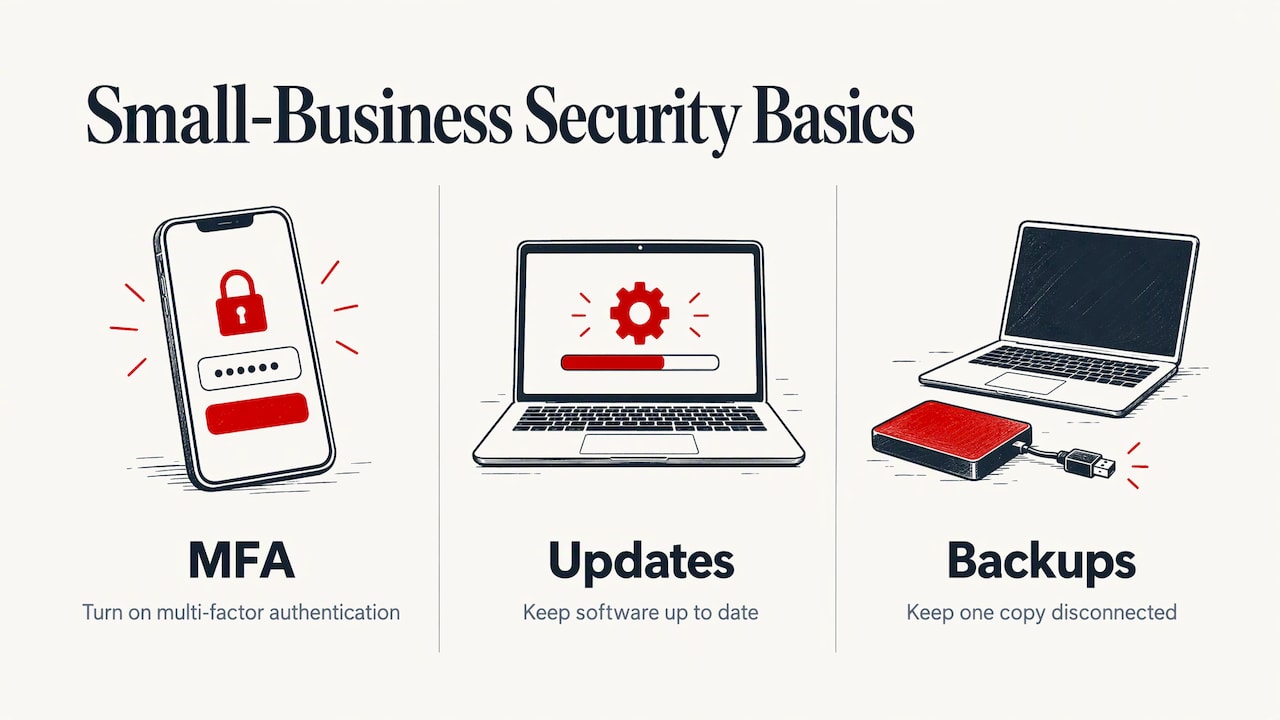
The same guide describes a small business that lost every backup file because a backup drive was left plugged into an infected computer and was encrypted along with everything else. The lesson for your office is practical: keep at least one backup copy disconnected from the computers it protects, and have a technician set it up so you know it works.
If you hold customer details, a lost laptop or a hacked mailbox may also trigger legal duties. Under the Privacy Act 1988, organisations the Act covers must notify affected people and the OAIC when a data breach is likely to cause serious harm. Whether your business is covered depends on its circumstances, so if you suspect a breach, act quickly and speak to a legal adviser or the OAIC.
If files have already vanished from a failed drive, stop using it and read what data is recoverable after a hard drive failure before anyone tries to fix it themselves. Continued use can overwrite data that could otherwise have been saved.
When repairs should become ongoing support
Break-fix repair is the right answer for a one-off fault. It becomes the wrong answer when the faults keep coming. Watch for these patterns:
- You have called for help three or more times in a quarter.
- Nobody knows when the last backup ran, or whether it can be restored.
- Staff keep their own workarounds for a printer or Wi-Fi that never quite works.
- A key employee is the unofficial IT person and it is costing you their real job.
- New starters and leavers are handled by whoever remembers.
At that point, proactive support is usually cheaper than reactive repair, because someone is looking after updates, security and backups before they fail. Our managed IT services in Perth cover exactly that, and the comparison in managed IT vs ad hoc support will help you decide which fits your size and budget. For smaller teams, the small business IT support page explains how it works with a handful of staff. Managed plan pricing is on the pricing page.
How to choose a business computer repair provider
A local, experienced technician beats a faceless call centre for most offices under fifty people. Use this checklist when you compare:
- Response time. When something stops the business, “next week” is not an answer. Ask what the realistic response is.
- Onsite and remote. You want both, so each fault gets the quickest route.
- Transparent pricing. Hourly rate, call-out fee, weekend loadings and parts quotes should be stated before you book.
- A guarantee. Look for written terms, such as a ‘No fix, no fee’ policy and a guarantee period on the work.
- Business range. Network, email, security, printers and backup, not only laptop screens.
- Plain English. Your team should understand what was done.
- Local presence. Perth technicians know the local suburbs, the local internet options and which jobs need a same-day visit.
We work across the metro area, with local pages for suburbs such as Maylands, Midland, Rivervale and Bentley.
Our perspective
Most business owners call us at the worst possible moment: the invoice run is due, a customer is waiting, and a computer has decided to stop. We understand that, so we built our service around it.
We do not charge a call-out fee or a weekend surcharge, because a breakdown does not respect business hours. We publish our rates, and we explain what we find in plain English, so you can make the decision, not guess at it. If we cannot fix it, you do not pay. If a repair fails within 30 days, we put it right.
The other thing we believe is that the best repair is the one you only need once. When we fix a machine, we look at the backups, the updates and the security around it, and tell you what we would do next. Some businesses never need more than the occasional visit. Others find a managed plan means they stop calling us in a panic. Either way, you get an experienced local technician who treats your office like it matters.
Shuan
Get your business back up and running
If a computer, network or printer is holding your team up, our business IT support is built for exactly this: onsite or remote, from $165 per hour (AUD), with no call-out fee and a ‘No fix, no fee’ policy. Tell us what is happening and who is affected, and we will tell you the quickest route to fixing it.
You can see all of our services, from data recovery to CCTV and smart home installation, on the Microsys home page, or check the full rates on the pricing page.
FAQ
How much does business computer repair cost in Perth?
At Microsys, business IT support starts from $165 per hour (AUD) and there is no call-out fee or weekend surcharge. Parts are quoted separately before we order them. Current rates are on our pricing page.
Can computer problems be fixed remotely?
Many can. Malware cleaning, software faults, slow performance caused by software, and Microsoft 365 or email problems are usually handled remotely. Physical faults such as screens, batteries, fans and network cabling need a technician onsite or a workshop repair.
What does ‘No fix, no fee’ mean?
It means that if we cannot fix the problem, you do not pay for the attempt. It is paired with a 30-day guarantee on workmanship and parts, so if the same fault returns within that time we address it.
Should my office use repair-as-needed or a managed plan?
If you need help rarely, pay-as-you-go repair is simple and sensible. If you are calling often, or nobody is checking backups, updates and security, a managed plan is designed to prevent problems before they stop your team. Our comparison page sets out the differences.
What should I do before a technician arrives?
Note when the problem started, what changed just before it and who is affected. Do not keep using a computer that may have a failing drive or malware, and have the device, charger and any error messages on hand.
Sources
Recommended
- Computer Repairs Perth | Cloverdale Workshop & Onsite
- Computer Repairs Perth CBD
- Computer Repairs East Perth
- Signs Your Computer Needs Professional Repair
Written with BabyLoveGrowth’s technology
Filed under: Uncategorized